Node.js Worker Threads in 2026: True Parallelism for CPU-Bound APIs
Node.js was built around a single-threaded event loop, and for nearly a decade that was treated as a feature rather than a limitation. But as APIs in 2026 ship more bcrypt hashing, JSON Web Token signing, image transforms, PDF generation, vector embeddings for AI features, and on-the-fly data crunching, the single-threaded model starts to bite. One CPU-heavy request blocks the entire process, p99 latency explodes, and your container's other CPU cores sit idle while users wait.
Worker threads are how modern Node.js teams solve this. They give you true parallelism inside a single Node process — real OS threads, real CPU utilisation across cores, and a clean message-passing API that doesn't require the operational overhead of spawning separate processes. This guide is the 2026 playbook: when to reach for workers, how to build a production-ready pool, what the real benchmarks look like, and which mistakes will silently destroy your throughput.
Why the Event Loop Stalls on CPU Work
Node.js handles tens of thousands of concurrent connections by never blocking on I/O — every network read, file read, and database call is offloaded to libuv's thread pool, freeing the event loop to keep accepting requests. This works beautifully right up until your code does CPU work itself. A single bcrypt hash at cost factor 12 takes roughly 240 ms on a modern x86 core. While that hash is running, the event loop is frozen. Every other request — including your healthcheck — waits in line.
The Math: Why a Single Thread Can't Keep Up
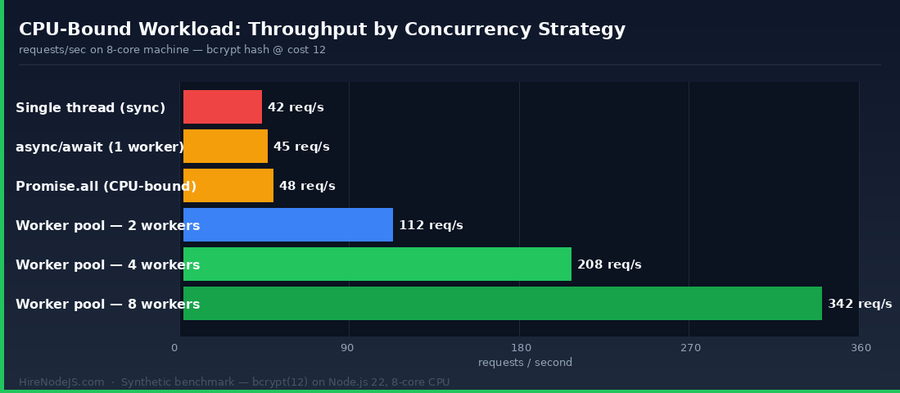
If a CPU task takes 240 ms and your container processes one at a time, your absolute ceiling is about 4 requests per second per instance, no matter how powerful the machine. Throwing more CPUs at a single-threaded Node process is wasted spend — the runtime never sees them. On an 8-core machine doing CPU-bound work without workers, you're paying for 8 cores and using one.
Where async/await Doesn't Help
A common misconception: if I `await` it, surely it runs concurrently? Not for synchronous CPU work. `await` only yields control while a Promise is pending — and a CPU loop returns synchronously, so the event loop is blocked end-to-end. `Promise.all` over CPU-bound work gives you exactly zero speedup; it just runs the work back-to-back.
Worker Threads, Cluster, and child_process — Pick the Right Tool
Node.js offers three concurrency primitives, and developers regularly reach for the wrong one. Worker threads are designed specifically for CPU-bound work inside a single process. The cluster module forks the entire process to load-balance HTTP traffic across cores. child_process spawns a separate program for isolation. They are not interchangeable, and getting this wrong leads to operational pain.
Worker Threads = parallelism inside the process
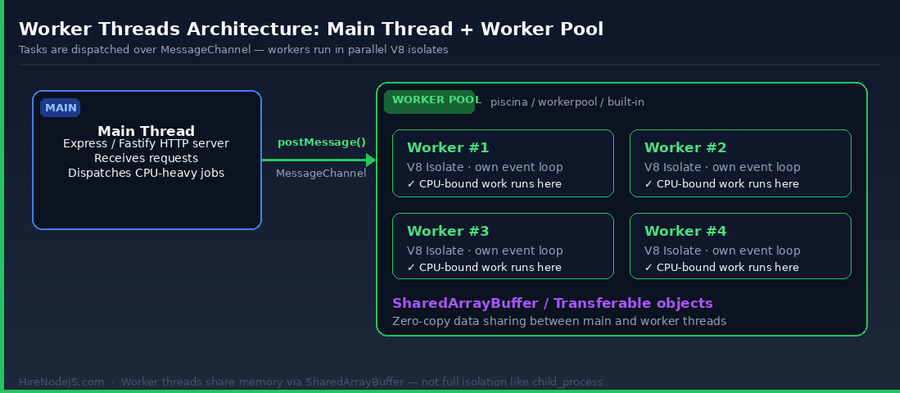
A worker thread is a fresh V8 isolate running in its own OS thread inside the same Node process. It has its own event loop, its own heap, and communicates with the main thread via MessageChannel. Crucially, it can share memory with the main thread through SharedArrayBuffer and Transferable objects — meaning you can pass a 50 MB image buffer to a worker without copying it.
Cluster = horizontal HTTP scaling
Cluster forks N copies of your entire process and round-robins incoming HTTP connections between them. It's the right answer for scaling stateless HTTP endpoints to use multiple cores without putting a load balancer in front. It is the wrong answer for offloading CPU work inside a single request.
child_process = full isolation
Use child_process when you genuinely need a separate program — running a Python ML model, calling ffmpeg, or sandboxing untrusted code. It has the highest startup cost and the heaviest memory footprint, but offers the strongest isolation guarantees.
Building a Production Worker Pool
Spinning up a fresh Worker per request is one of the most common mistakes. Worker startup costs roughly 50–100 ms — at high request rates you'll spend more time creating workers than doing work. The solution is a pool of long-lived workers that pull tasks from a queue. You can write your own in 80 lines, or pull in `piscina` or `workerpool` and skip ahead.
Minimal pool with the built-in worker_threads module
The example below shows a tight, production-style worker pool that processes bcrypt hashes. The main thread accepts work, dispatches it to whichever worker is idle, and resolves a Promise when the result comes back. Workers stay alive for the lifetime of the process.
// pool.js — minimal Node.js worker pool
import { Worker } from 'node:worker_threads';
import { fileURLToPath } from 'node:url';
import { dirname, join } from 'node:path';
import os from 'node:os';

const __dirname = dirname(fileURLToPath(import.meta.url));

export class WorkerPool {
  constructor(size = os.availableParallelism()) {
    this.workers = [];
    this.queue = [];
    for (let i = 0; i < size; i++) {
      const w = new Worker(join(__dirname, 'worker.js'));
      w.busy = false;
      w.on('message', (result) => {
        const { resolve } = w.current;
        w.busy = false;
        w.current = null;
        resolve(result);
        this._next();
      });
      w.on('error', (err) => w.current?.reject(err));
      this.workers.push(w);
    }
  }

  run(payload) {
    return new Promise((resolve, reject) => {
      this.queue.push({ payload, resolve, reject });
      this._next();
    });
  }

  _next() {
    if (!this.queue.length) return;
    const idle = this.workers.find((w) => !w.busy);
    if (!idle) return;
    const job = this.queue.shift();
    idle.busy = true;
    idle.current = job;
    idle.postMessage(job.payload);
  }

  async destroy() {
    await Promise.all(this.workers.map((w) => w.terminate()));
  }
}// worker.js — runs inside each worker thread
import { parentPort } from 'node:worker_threads';
import bcrypt from 'bcrypt';
parentPort.on('message', async ({ password, cost }) => {
try {
const hash = await bcrypt.hash(password, cost);
parentPort.postMessage({ ok: true, hash });
} catch (err) {
parentPort.postMessage({ ok: false, error: err.message });
}
});Sharing Memory Without Copying It
By default, every message sent through `postMessage` is structured-cloned — a deep copy. For small JSON payloads that's fine. For a 50 MB image buffer or a 200 MB Float32Array of vector embeddings, deep copying is a disaster: it doubles your memory and adds 30–50 ms of pure CPU to every job. Two mechanisms let you avoid this.
Hire Pre-Vetted Node.js Developers
Skip the months-long search. Our exclusive talent network has senior Node.js experts ready to join your team in 48 hours.
Transferable objects
If you pass an `ArrayBuffer` (or anything backed by one — `Uint8Array`, `Buffer`, `MessagePort`) as the second argument to `postMessage`, ownership transfers to the worker and the original becomes unusable on the main thread. Zero copy, zero extra memory. This is the right answer for fire-and-forget jobs where the main thread is done with the buffer.
SharedArrayBuffer for true sharing
When both threads need to read or write the same memory simultaneously — for example, a worker streaming partial results back into a buffer the main thread is reading — use `SharedArrayBuffer`. Combined with `Atomics.wait`/`Atomics.notify`, it gives you primitive-level parallel coordination, though most teams should reach for a higher-level pool first and only drop to atomics for hot-path optimisation.
Real Workloads Where Workers Pay Off (and Where They Don't)
Worker threads are not free. Each one consumes 25–35 MB of RSS at idle, plus the cost of any modules it imports. Adding workers to a workload that doesn't need them is pure overhead. Reach for them when CPU profiling shows synchronous work blocking the event loop.
Strong fits
Password hashing (bcrypt, argon2), JWT signing under load, image and video transcoding, PDF generation, server-side React rendering for dynamic personalisation, vector similarity search before falling back to a vector DB, parsing or compressing large CSV/Parquet files, and any deterministic transform that runs longer than ~10 ms per call.
Workloads where workers don't help
Pure I/O — database queries, HTTP calls to upstream services, file system reads — already runs concurrently in libuv's pool. Wrapping it in a worker adds latency and memory for zero benefit. The same applies to lightweight JSON validation, simple string templating, and anything you'd reasonably expect to finish in under a millisecond.
Performance Tuning, Backpressure, and Common Pitfalls
Right-size the pool
The single most common mistake: pool size != core count. On an 8-core machine, set the pool to 8 workers, not 16, not 4. Read it dynamically with `os.availableParallelism()` (preferred over `os.cpus().length` since Node 19 — it respects cgroup CPU quotas in containers). Over-provisioning causes context-switching that quietly drops throughput, exactly what the interactive chart above demonstrates.
Add backpressure to your queue
An unbounded queue in front of your pool will happily accept a million pending tasks and OOM your process. Cap it. If `pool.queue.length > MAX_QUEUE`, return HTTP 429 or 503 immediately. Surface queue depth as a Prometheus metric so you can alert on it.
Watch out for unhandled errors
An uncaught exception in a worker emits an `error` event and the worker terminates. If your pool doesn't replace dead workers, you'll silently bleed capacity until throughput collapses. Wire up `worker.on('exit', ...)` to log and respawn, and treat any non-zero exit code as a bug to investigate.
Production Reality: Who Actually Builds This Well
Worker pools, MessageChannel, SharedArrayBuffer atomics — these aren't beginner concepts. Most Node.js developers can describe what worker threads are; far fewer have actually shipped a tuned pool with backpressure, observability, and graceful shutdown. If you're building a CPU-bound API and need someone who has done it before, HireNodeJS connects you with pre-vetted senior Node.js engineers who can plug in within 48 hours — engineers who already know when worker threads are the answer and when they aren't. For teams scaling backend infrastructure, our backend developer specialists come with hands-on worker pool, queueing, and performance-tuning experience.
Hire Expert Node.js Developers — Ready in 48 Hours
Building the right worker thread architecture is only half the battle — you need engineers who understand why a 12-worker pool can be slower than an 8-worker pool, and how to wire up backpressure before production traffic finds the gap. HireNodeJS.com specialises exclusively in Node.js talent: every developer is pre-vetted on real-world projects covering API design, event-driven architecture, worker pools, and production deployments under load.
Unlike generalist platforms, our curated pool means you speak only to engineers who live and breathe Node.js. Most clients have their first developer working within 48 hours of getting in touch. Engagements start as short-term contracts and can convert to full-time hires with zero placement fee.
The Bottom Line for 2026
Worker threads turn Node.js from a single-threaded I/O server into a runtime that can saturate every core in your container. If your service does any CPU-bound work — auth hashing, image processing, server-side rendering, ML inference, large data transforms — a pooled worker_threads architecture is no longer a 'nice optimisation' in 2026, it's the baseline. Pair it with `os.availableParallelism()`, a bounded queue, transferable buffers for big payloads, and observability on queue depth, and you'll get near-linear throughput scaling without the operational complexity of microservices. Anything less and you're paying for cores you'll never use.
Frequently Asked Questions
When should I use Node.js worker threads instead of async/await?
Use worker threads when your code does synchronous CPU work that takes more than about 10 ms per call — bcrypt, image transforms, PDF generation, ML inference. async/await only helps with I/O-bound concurrency. CPU-bound `Promise.all` runs the work serially and gives no speedup.
How many worker threads should I create?
Match the worker count to `os.availableParallelism()` (which respects container CPU quotas). On an 8-core machine, that means 8 workers for pure CPU work. Going higher causes context-switching and reduces throughput, as the interactive chart in this article shows.
What's the difference between worker_threads and the cluster module?
Worker threads run multiple V8 isolates inside a single Node process and are designed for CPU-bound work in a single request. Cluster forks the entire process to load-balance HTTP traffic across cores. They solve different problems and many production systems use both at once.
Do worker threads share memory with the main thread?
They can. Use SharedArrayBuffer for shared memory both threads can read and write, or pass an ArrayBuffer as a transferable to move ownership without copying. Without those, postMessage performs a structured clone of the payload.
Are worker threads good for security isolation or sandboxing untrusted code?
No. Worker threads share the same process and a buggy native module can crash the whole thing. For real isolation use child_process, isolated-vm, or a separate container or VM.
Should I use a library like piscina, or build my own pool?
For most teams, use piscina or workerpool — they handle queueing, lifecycle, and error recovery and are battle-tested. Build your own only when you need very specific scheduling or you are optimising hot-path microseconds.
Vivek Singh is the founder of Witarist and HireNodeJS.com — a platform connecting companies with pre-vetted Node.js developers. With years of experience scaling engineering teams, Vivek shares insights on hiring, tech talent, and building with Node.js.
Want a Node.js engineer who ships fast, optimised APIs?
HireNodeJS connects you with pre-vetted senior Node.js engineers who already know worker pools, queue backpressure, and CPU profiling — available within 48 hours. No recruiter fees, no lengthy screening.